8-Item Sorter
Published on January 1, 2023
By Zach5928
👁️🗨️ 160
36
★
★
★
★
★
Rate it
Screenshots
Description
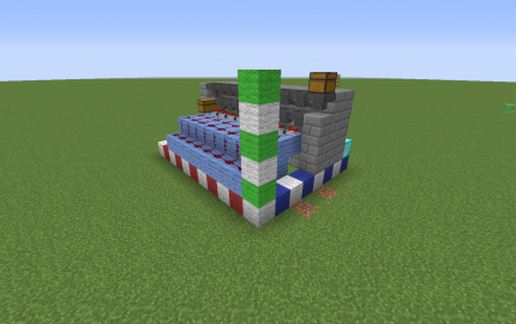
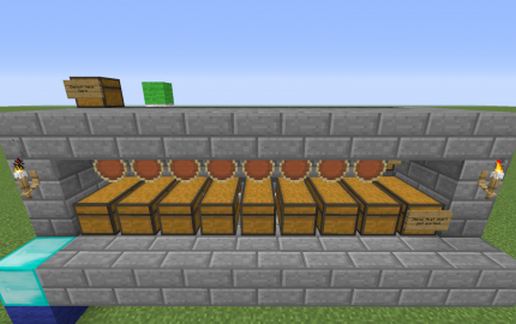
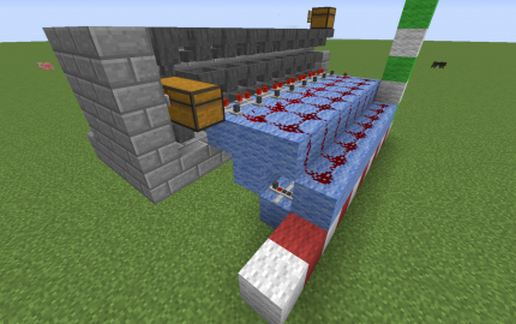
I made this simple 8-item sorter. When you paste the schematic, you will be standing on the diamond block, facing the torch. The main picture is what the schematic is. It does not have the red, green, and blue size bars. Just choose which 8 items you want to sort and throw 64 of each into the "Deposit Here" chest. It will sort through any more items you put in and what ever doesn't get sorted, ends up at the chest on the far right.
Download: 8-Item Sorter schematic for Minecraft
| Format | Size | Use with | |
|---|---|---|---|
.litematic 8-item-sorter.litematic |
32.49 KB | Litematica (Java) — more Litematica schematics |
|
.schem 8-item-sorter.schem |
660.00 B | WorldEdit / FAWE |
|
.schematic 8-item-sorter.schematic |
1.42 KB | Legacy / online installer |
|
| Install this build directly on your Minecraft map |
|
||
Auto-converted from the original format; container contents (chests, signs) may be missing.
📘 How to use with Litematica (click to expand)
- Put the downloaded
.litematicfile into the.minecraft/schematics/folder. - In game, press M to open the Litematica menu and choose Load Schematics.
- Select the file in the list and click Load Schematic.
- Position the placement where you want it and build — or paste it instantly in creative with Easy Place mode.
Requires the Litematica mod (Java Edition).
More builds: Litematica schematics.
Comments
Similar