Indestructible Iron Door
Published on January 1, 2023
By Mikeoz28
👁️🗨️ 167
28
★
★
★
★
★
Rate it
Description
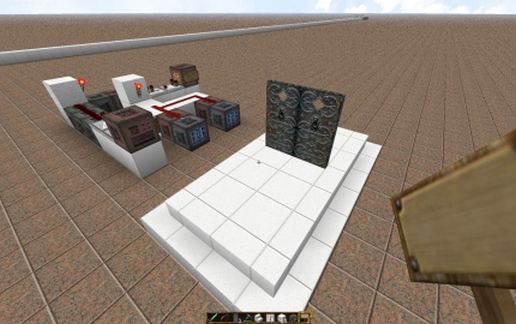
How would you like an indestructible iron door with the added feature it will open complete with sound and when you leave close. This door is just that. To test it out insert it into your world without rotation using MC edit. Make sure you tick the box that fixes command block coordinates. This will work as long as you do not rotate. Try to break the door in survival mode or creative mode you will not be able to. Look at the command block mechanisms alongside two of them have signs. There will be writing on them as long as you have not used 1.5.2.1 of MC edit. Alter the commands in these blocks change the name to yours. Having done so you will find you are able walk towards the door it will open and go clang walk away from it and it will close with a clang as well. Now as a secured door it is not much use with all the command blocks hanging out there. Go back into MC edit cut the command block mechanism and place it anywhere you like. Just make sure you did not tick the fix coordinate changes. That is what the 2nd photo is about I have hidden the controlling command block mechanism. Leaving an apparently bare pair of doors. Now that's it but you might be thinking just break in by going around the doors. Using the same techniques for the doors one could construct a box that couldn't be broken into. Or what I would prefer insert into your command block chain a teleport command block. So you walk through the door and go anywhere in your world. Final note this is done in version 1.9.2 and depends on the new command blocks. Enjoy.
Download: Indestructible Iron Door schematic for Minecraft
| Format | Size | Use with | |
|---|---|---|---|
.litematic indestructible-iron-door.litematic |
47.71 KB | Litematica (Java) — more Litematica schematics |
|
.schem indestructible-iron-door.schem |
783.00 B | WorldEdit / FAWE |
|
.schematic indestructible-iron-door.schematic |
997.00 B | Legacy / online installer |
|
| Install this build directly on your Minecraft map |
|
||
Auto-converted from the original format; container contents (chests, signs) may be missing.
📘 How to use with Litematica (click to expand)
- Put the downloaded
.litematicfile into the.minecraft/schematics/folder. - In game, press M to open the Litematica menu and choose Load Schematics.
- Select the file in the list and click Load Schematic.
- Position the placement where you want it and build — or paste it instantly in creative with Easy Place mode.
Requires the Litematica mod (Java Edition).
More builds: Litematica schematics.
Comments
Similar