Nether Golem Statue
Published on January 1, 2023
By Omanoctoa
👁️🗨️ 148
26
★
★
★
★
★
Rate it
Description
Now for something a little different...
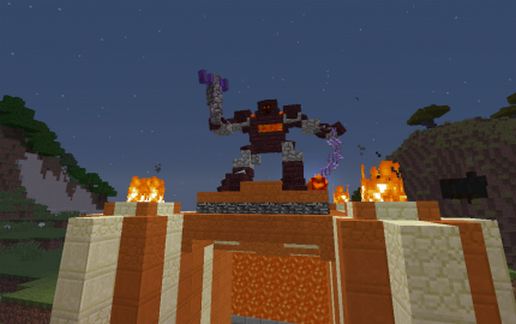
This is a decorative statue created by almost solely by Armour Stands. It took quite a while to create and I decided it would be nice to show it off. It contains roughly 50 invisible Armour Stands, a few player heads and 1 Banner. What is really really cool about it, is it works almost perfectly with any texture pack, as most of the blocks on the armour stands are regular blocks and will change with the pack. There are a few player heads (the lava) and one mob head that will not change accordingly, but they look good regardless.
The statue is roughly 8-9 blocks wide, 9 blocks tall and 3-4 blocks deep and is surrounded by Barriers to prevent accidental breakage. It also pastes with part of the floor, including the lava. The bedrock was to ensure players did not use explosives to break the stands from below. I left these parts in because they have a nice look - if you need to remove them, I recommend editing the statue in mcEdit, or carefull WorldEditing around them ingame.
IMPORTANT: YOU MUST PASTE THIS USING MCEDIT - it cannot be pasted ingame with WorldEdit to my knowledge, as WE will break the skulls, banner and some of the stands! If you do decide to paste ingame, it should appear beside you at ground level.
CREATED IN MINECRAFT 1.9
You can see this Statue live @ mc.endlesshorizons.co.uk
As usual, if you use my creation please provide some credit :)
This is a decorative statue created by almost solely by Armour Stands. It took quite a while to create and I decided it would be nice to show it off. It contains roughly 50 invisible Armour Stands, a few player heads and 1 Banner. What is really really cool about it, is it works almost perfectly with any texture pack, as most of the blocks on the armour stands are regular blocks and will change with the pack. There are a few player heads (the lava) and one mob head that will not change accordingly, but they look good regardless.
The statue is roughly 8-9 blocks wide, 9 blocks tall and 3-4 blocks deep and is surrounded by Barriers to prevent accidental breakage. It also pastes with part of the floor, including the lava. The bedrock was to ensure players did not use explosives to break the stands from below. I left these parts in because they have a nice look - if you need to remove them, I recommend editing the statue in mcEdit, or carefull WorldEditing around them ingame.
IMPORTANT: YOU MUST PASTE THIS USING MCEDIT - it cannot be pasted ingame with WorldEdit to my knowledge, as WE will break the skulls, banner and some of the stands! If you do decide to paste ingame, it should appear beside you at ground level.
CREATED IN MINECRAFT 1.9
You can see this Statue live @ mc.endlesshorizons.co.uk
As usual, if you use my creation please provide some credit :)
Download: Nether Golem Statue schematic for Minecraft
| Format | Size | Use with | |
|---|---|---|---|
.litematic nether-golem-statue.litematic |
37.79 KB | Litematica (Java) — more Litematica schematics |
|
.schem nether-golem-statue.schem |
966.00 B | WorldEdit / FAWE |
|
.schematic nether-golem-statue.schematic |
9.68 KB | Legacy / online installer |
|
| Install this build directly on your Minecraft map |
|
||
Auto-converted from the original format; container contents (chests, signs) may be missing.
📘 How to use with Litematica (click to expand)
- Put the downloaded
.litematicfile into the.minecraft/schematics/folder. - In game, press M to open the Litematica menu and choose Load Schematics.
- Select the file in the list and click Load Schematic.
- Position the placement where you want it and build — or paste it instantly in creative with Easy Place mode.
Requires the Litematica mod (Java Edition).
More builds: Litematica schematics.
Comments
Similar