M4A3E8 Sherman Tank
Published on January 1, 2023
By G3tR3ktByNathan
👁️🗨️ 193
95
★
★
★
★
★
Rate it
Screenshots
Description
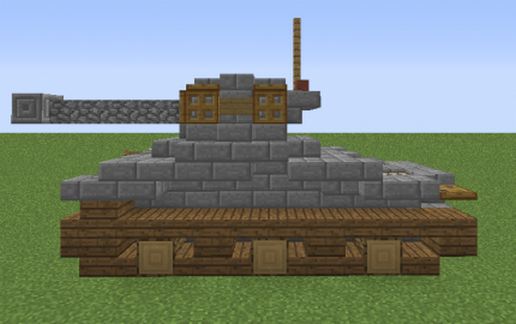
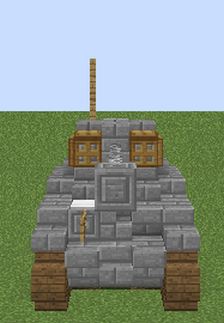
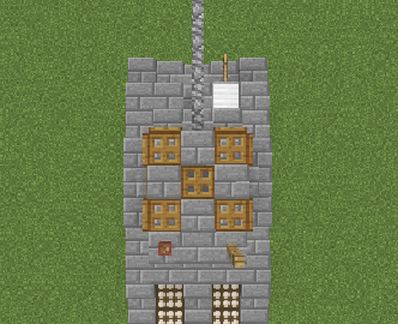
Hello there! Nathan here, bringing you a new tank design: the Sherman M4A3E8 or the M4 Sherman Easy Eight. Enjoy:
-~-STORY TIME-~-
The M4 Sherman, (formally known as Medium Tank M4) was the primary tank used by the United States during World War 2. Thousands were also distributed to the Allies, including the British Commonwealth, Soviet armies and many more allied countries by the lend-lease method. In the United Kingdom, the M4 was named after Union General William T. Sherman, following the British naming their American-built tanks after the famous American Civil War general, and thats how the British name found its way as the name for the tank. Many variations have been made from 1942 until the end of the war. I (The creator of this schematic) chose the tank because of the movie 'Fury'. In the movie a tank crew fights through late World War 2, Germany. A modified version of the Sherman M4A2E8 from a British museum was used to mimic the M4A3E8.
That's it for now! I hope you liked the small history lesson i gave you! Rate my creation and be sure to leave some feedback in the comment section below!
Have a nice day!
Nathan A.K.A G3tR3ktByNathan...
-~-STORY TIME-~-
The M4 Sherman, (formally known as Medium Tank M4) was the primary tank used by the United States during World War 2. Thousands were also distributed to the Allies, including the British Commonwealth, Soviet armies and many more allied countries by the lend-lease method. In the United Kingdom, the M4 was named after Union General William T. Sherman, following the British naming their American-built tanks after the famous American Civil War general, and thats how the British name found its way as the name for the tank. Many variations have been made from 1942 until the end of the war. I (The creator of this schematic) chose the tank because of the movie 'Fury'. In the movie a tank crew fights through late World War 2, Germany. A modified version of the Sherman M4A2E8 from a British museum was used to mimic the M4A3E8.
That's it for now! I hope you liked the small history lesson i gave you! Rate my creation and be sure to leave some feedback in the comment section below!
Have a nice day!
Nathan A.K.A G3tR3ktByNathan...
Download: M4A3E8 Sherman Tank schematic for Minecraft
| Format | Size | Use with | |
|---|---|---|---|
.litematic m4a3e8-sherman-tank.litematic |
35.17 KB | Litematica (Java) — more Litematica schematics |
|
.schem m4a3e8-sherman-tank.schem |
940.00 B | WorldEdit / FAWE |
|
.schematic m4a3e8-sherman-tank.schematic |
424.00 B | Legacy / online installer |
|
| Install this build directly on your Minecraft map |
|
||
Auto-converted from the original format; container contents (chests, signs) may be missing.
📘 How to use with Litematica (click to expand)
- Put the downloaded
.litematicfile into the.minecraft/schematics/folder. - In game, press M to open the Litematica menu and choose Load Schematics.
- Select the file in the list and click Load Schematic.
- Position the placement where you want it and build — or paste it instantly in creative with Easy Place mode.
Requires the Litematica mod (Java Edition).
More builds: Litematica schematics.
Comments
Similar