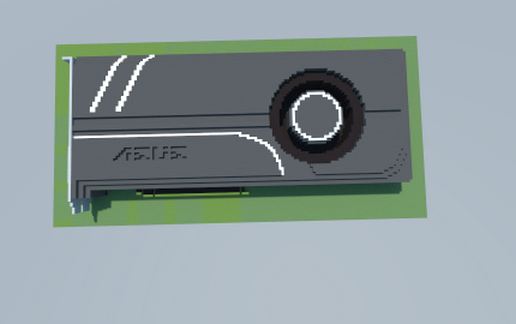
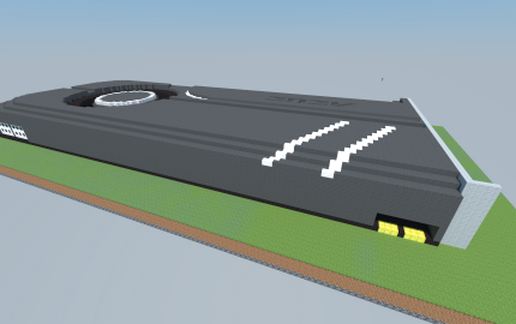
NVIDIA GeForce GTX 1060 TURBO (ASUS)
Published on January 1, 2023
By MatthewStevenGo
👁️🗨️ 124
26
★
★
★
★
★
Rate it
Screenshots
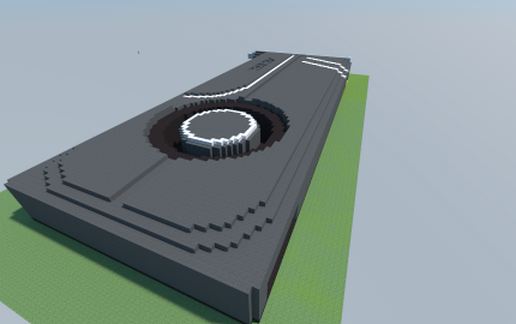
Description
The ASUS's VR-ready NVIDIA GeForce GTX 1060 BOOST
= Graphics Engine: NVIDIA GeForce GTX 1060
= Bus Standard: PCI Express 3.0
= OpenGL: OpenGL 4.5
= Video Memory: GDDR5 6GB
= Engine Clock:
-GPU Boost Clock: 1708 MHz
-GPU Base Clock: 1506 MHz
= CUDA Core: 1280
= Memory Clock: 8008 MHz
= Memory Interface: 192-bit
= Resolution:
-Digital Max Resolution:7680 x 4320
= Interface:
-DVI Output : Yes x 1 (Native) (DVI-D)
-HDMI Output : Yes x 2 (Native) (HDMI 2.0)
-Display Port : Yes x 2 (Native) (Regular DP)
-HDCP Support : Yes
= Software: ASUS GPU Tweak II & Driver
= Dimensions: 10.5 " x 4.38 " x 1.5 " Inch, 26.67 x 11.12 x3.81 Centimeter
= Note:
. To have the best cooling performance, ASUS TURBO GTX1060 extends the fansink to 2 slots. Please double check you Chassis and Motherboard dimension prior to purchase to make sure it fits in your system!
. Note that the actual boost clock will vary depending on actual system conditions. For more information, please visit http://www.geforce.com/
Source: https://www.asus.com/Graphics-Cards/TURBO-GTX1060-6G/
= Graphics Engine: NVIDIA GeForce GTX 1060
= Bus Standard: PCI Express 3.0
= OpenGL: OpenGL 4.5
= Video Memory: GDDR5 6GB
= Engine Clock:
-GPU Boost Clock: 1708 MHz
-GPU Base Clock: 1506 MHz
= CUDA Core: 1280
= Memory Clock: 8008 MHz
= Memory Interface: 192-bit
= Resolution:
-Digital Max Resolution:7680 x 4320
= Interface:
-DVI Output : Yes x 1 (Native) (DVI-D)
-HDMI Output : Yes x 2 (Native) (HDMI 2.0)
-Display Port : Yes x 2 (Native) (Regular DP)
-HDCP Support : Yes
= Software: ASUS GPU Tweak II & Driver
= Dimensions: 10.5 " x 4.38 " x 1.5 " Inch, 26.67 x 11.12 x3.81 Centimeter
= Note:
. To have the best cooling performance, ASUS TURBO GTX1060 extends the fansink to 2 slots. Please double check you Chassis and Motherboard dimension prior to purchase to make sure it fits in your system!
. Note that the actual boost clock will vary depending on actual system conditions. For more information, please visit http://www.geforce.com/
Source: https://www.asus.com/Graphics-Cards/TURBO-GTX1060-6G/
Download: NVIDIA GeForce GTX 1060 TURBO (ASUS) schematic for Minecraft
| Format | Size | Use with | |
|---|---|---|---|
.litematic nvidia-geforce-gtx-1060-turbo-(asus).litematic |
25.67 KB | Litematica (Java) — more Litematica schematics |
|
.schem nvidia-geforce-gtx-1060-turbo-(asus).schem |
2.08 KB | WorldEdit / FAWE |
|
.schematic nvidia-geforce-gtx-1060-turbo-(asus).schematic |
3.25 KB | Legacy / online installer |
|
| Install this build directly on your Minecraft map |
|
||
Auto-converted from the original format; container contents (chests, signs) may be missing.
📘 How to use with Litematica (click to expand)
- Put the downloaded
.litematicfile into the.minecraft/schematics/folder. - In game, press M to open the Litematica menu and choose Load Schematics.
- Select the file in the list and click Load Schematic.
- Position the placement where you want it and build — or paste it instantly in creative with Easy Place mode.
Requires the Litematica mod (Java Edition).
More builds: Litematica schematics.
Comments
Similar