Automatic Redstone Streetlight
Published on January 1, 2023
By SeberHusky
👁️🗨️ 174
31
★
★
★
★
★
Rate it
Description
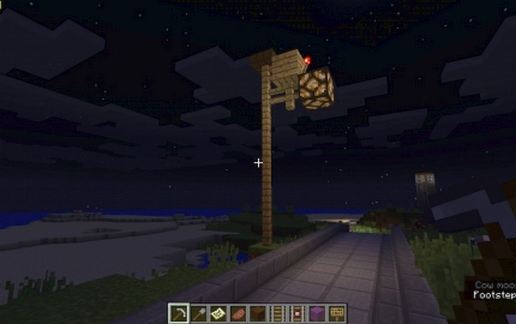
Redstone powered. It automatically comes on at dusk and off at sunrise. Very compact and simple in it's design, and easy to build when you have to make hundreds of them. It is attractive without being overly obnoxious and clunky. I recommend placing them every 40 blocks for a good appearance and even light distribution, with the posts being 7 blocks above the roadbed.
This is entirely my own design I invented around autumn 2013 or so and have been sitting on this ever since. Wasn't necessarily a big secret, just didn't feel like anyone would care. Now, I figured I should share it with you all as it really is very helpful for road and city building!
This is entirely my own design I invented around autumn 2013 or so and have been sitting on this ever since. Wasn't necessarily a big secret, just didn't feel like anyone would care. Now, I figured I should share it with you all as it really is very helpful for road and city building!
Download: Automatic Redstone Streetlight schematic for Minecraft
| Format | Size | Use with | |
|---|---|---|---|
.litematic automatic-redstone-streetlight.litematic |
36.84 KB | Litematica (Java) — more Litematica schematics |
|
.schem automatic-redstone-streetlight.schem |
401.00 B | WorldEdit / FAWE |
|
.schematic automatic-redstone-streetlight.schematic |
188.00 B | Legacy / online installer |
|
| Install this build directly on your Minecraft map |
|
||
Auto-converted from the original format; container contents (chests, signs) may be missing.
📘 How to use with Litematica (click to expand)
- Put the downloaded
.litematicfile into the.minecraft/schematics/folder. - In game, press M to open the Litematica menu and choose Load Schematics.
- Select the file in the list and click Load Schematic.
- Position the placement where you want it and build — or paste it instantly in creative with Easy Place mode.
Requires the Litematica mod (Java Edition).
More builds: Litematica schematics.
Comments
Similar