Portal floating island.
Published on January 1, 2023
By Billydog132
👁️🗨️ 224
39
★
★
★
★
★
Rate it
Screenshots
Description
Hey guys Im back!!! :D
So yeah, I remove the older schematic for reupload this!
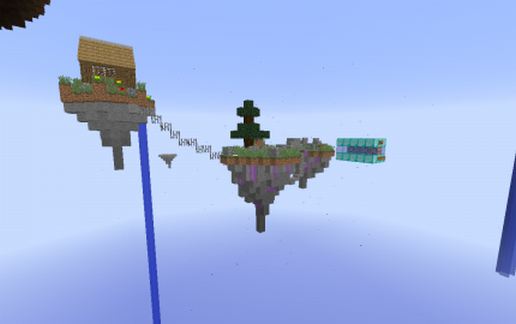
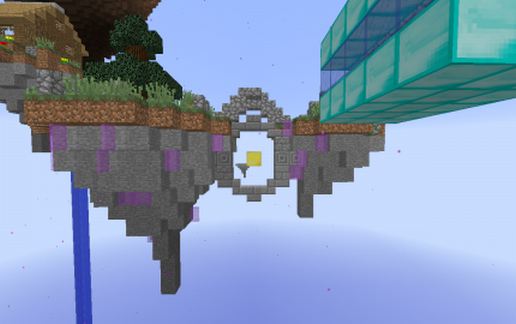
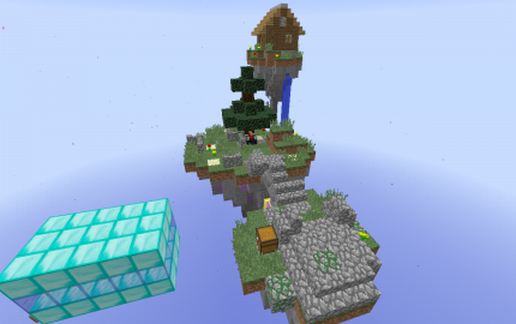
it's a Portal floating island.
It's simple: When you cross the portal with the elytra, you go up so you keep flying and it's cool for the sky island with the elytra. ;)
This schematic contain 2 chests with normal stuff and portal particle around the island.
!WARNING! read the tutorial: it to make the island working.
--First step: you have to press the button for add the scoreboard: "fly", it will make the island working when you cross the portal.
If you have already add the scoreboard: "fly", you have to destroy the diamond structure. (if you have another island who work like this)
--Second step: Take the coordinate (x,y and z) of the gold block of the center of the circle between 2 island.
--Third step: There are 3 commands to change for make the island working: Find 3 command_blocks with a dragon head above by using gamemode 3 or MCedit.
In each commands: Replace the "XXX" by the coordinate of the golden block and Remove the "0" at the end of the commands.
Remove the golden block and the dragon head if you want.
And it's over!!!, you can finally use the floating island for our projects or just for fun!
P.S: I was thinking by using the levitation effect before but it doesn't work when you using the elytra. (maybe in the future)
Hope you guys enjoy. :)
And pls, I want you to support for the future of my creations by send a comments with your opinion about this creation and the others and rate.
It will be helpful so don't forget!!
Thank you all and have fun!!
So yeah, I remove the older schematic for reupload this!
it's a Portal floating island.
It's simple: When you cross the portal with the elytra, you go up so you keep flying and it's cool for the sky island with the elytra. ;)
This schematic contain 2 chests with normal stuff and portal particle around the island.
!WARNING! read the tutorial: it to make the island working.
--First step: you have to press the button for add the scoreboard: "fly", it will make the island working when you cross the portal.
If you have already add the scoreboard: "fly", you have to destroy the diamond structure. (if you have another island who work like this)
--Second step: Take the coordinate (x,y and z) of the gold block of the center of the circle between 2 island.
--Third step: There are 3 commands to change for make the island working: Find 3 command_blocks with a dragon head above by using gamemode 3 or MCedit.
In each commands: Replace the "XXX" by the coordinate of the golden block and Remove the "0" at the end of the commands.
Remove the golden block and the dragon head if you want.
And it's over!!!, you can finally use the floating island for our projects or just for fun!
P.S: I was thinking by using the levitation effect before but it doesn't work when you using the elytra. (maybe in the future)
Hope you guys enjoy. :)
And pls, I want you to support for the future of my creations by send a comments with your opinion about this creation and the others and rate.
It will be helpful so don't forget!!
Thank you all and have fun!!
Download: Portal floating island. schematic for Minecraft
| Format | Size | Use with | |
|---|---|---|---|
.schematic portal-floating-island..schematic |
— | Legacy / online installer |
|
Install this build directly on your Minecraft map
📘 How to use with Litematica (click to expand)
- Put the downloaded
.litematicfile into the.minecraft/schematics/folder. - In game, press M to open the Litematica menu and choose Load Schematics.
- Select the file in the list and click Load Schematic.
- Position the placement where you want it and build — or paste it instantly in creative with Easy Place mode.
Requires the Litematica mod (Java Edition).
More builds: Litematica schematics.