RedStop PC
Published on January 1, 2023
By RedStop
👁️🗨️ 223
1071
★
★
★
★
★
Rate it
Screenshots
Description
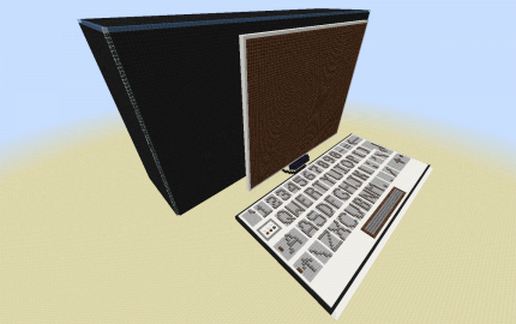
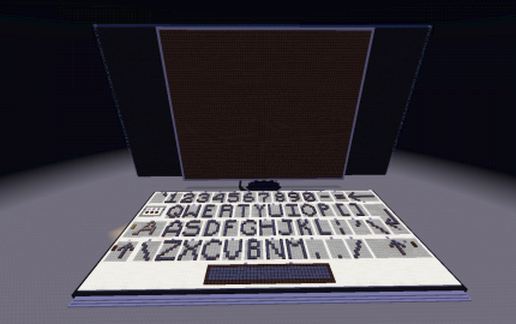
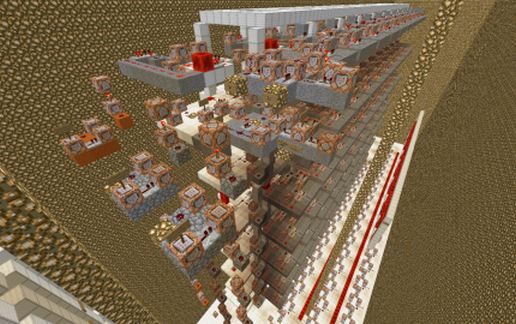
This is a Minecraft redstone PC with a fully working keyboard.
The screen has 10 x 7 (70) characters and it is quite fast when compared to other Minecraft PC's.
(It's actually a type machine, but other people on the internet call it a PC, so I'll go with it.)
Every key (except a space) have a lower and upper case character, so look on your own keyboard to see what the upper case character is.
--- I started working on this when Minecraft 1.6 came out, but I never finished it. Then I decided to finish it this holiday (December 2016) and now Minecraft 1.11 is available.
Requirements (If you want to use this PC on your PC):
● Fast PC (Dual core CPU at least)
● Enough RAM (6GB or more)
(Render distance: Min: 10 chunks, Recommended: 12 or more chunks)
● Video card
● Minecraft 1.11 or higher
● I recommend MCedit to import this to your world.
Do NOT rotate this!!
Also do not spam the keys, but wait until the character appears on the screen before entering the next character.
You are welcome to use this schematic in other worlds, just give a link to this page.
If you want to reference to the download of this schematic, please reference to this page and not a direct link to the download.
---Enjoy---
P.S.
If someone wants to make a better (and higher quality) video for this PC, please link to it in the comments below.
The screen has 10 x 7 (70) characters and it is quite fast when compared to other Minecraft PC's.
(It's actually a type machine, but other people on the internet call it a PC, so I'll go with it.)
Every key (except a space) have a lower and upper case character, so look on your own keyboard to see what the upper case character is.
--- I started working on this when Minecraft 1.6 came out, but I never finished it. Then I decided to finish it this holiday (December 2016) and now Minecraft 1.11 is available.
Requirements (If you want to use this PC on your PC):
● Fast PC (Dual core CPU at least)
● Enough RAM (6GB or more)
(Render distance: Min: 10 chunks, Recommended: 12 or more chunks)
● Video card
● Minecraft 1.11 or higher
● I recommend MCedit to import this to your world.
Do NOT rotate this!!
Also do not spam the keys, but wait until the character appears on the screen before entering the next character.
You are welcome to use this schematic in other worlds, just give a link to this page.
If you want to reference to the download of this schematic, please reference to this page and not a direct link to the download.
---Enjoy---
P.S.
If someone wants to make a better (and higher quality) video for this PC, please link to it in the comments below.
Download: RedStop PC schematic for Minecraft
| Format | Size | Use with | |
|---|---|---|---|
.litematic redstop-pc.litematic |
73.75 KB | Litematica (Java) — more Litematica schematics |
|
.schem redstop-pc.schem |
17.14 KB | WorldEdit / FAWE |
|
.schematic redstop-pc.schematic |
43.72 KB | Legacy / online installer |
|
| Install this build directly on your Minecraft map |
|
||
Auto-converted from the original format; container contents (chests, signs) may be missing.
📘 How to use with Litematica (click to expand)
- Put the downloaded
.litematicfile into the.minecraft/schematics/folder. - In game, press M to open the Litematica menu and choose Load Schematics.
- Select the file in the list and click Load Schematic.
- Position the placement where you want it and build — or paste it instantly in creative with Easy Place mode.
Requires the Litematica mod (Java Edition).
More builds: Litematica schematics.
Comments
Similar
![Big Mountain [v.1.0] schematic - building](/static/images/schematics/10/13261.jpg)