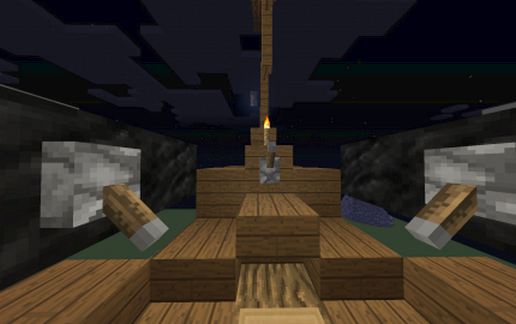
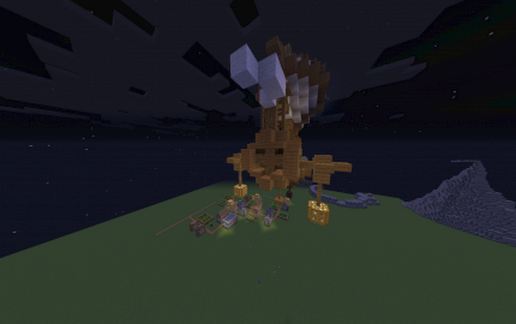
"Seahorse" - Battle Airship
Published on January 1, 2023
By me47the2nd
👁️🗨️ 59
24
★
★
★
★
★
Rate it
Screenshots
Description
[b]I AM NOW GOING BY THE NAME "MehMC" INGAME! PLEASE USE THAT IN ANY CREDITS[b]
Recently, I've been doing a series of really cool airships. Each one I built seemed to be better than the previous one, so I decided I'd post this one on Minecraft Schematics! Yeah, this is the first one I'm posting one here here. I'm probable going to be making more, as I really do have fun building them.
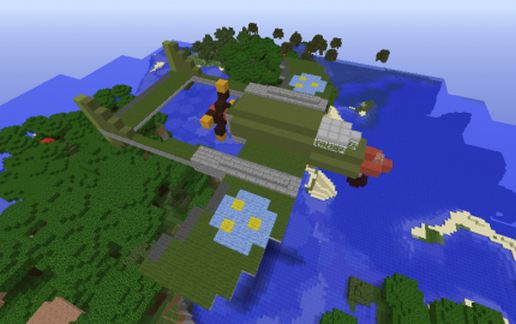
The "Seahorse" is named for the tail-like propeller on it back. It is created with precision detailing and quite a bit of effort, making it a wonderful addition to any "Sky" or "Steampunk" themed world.
[b]TERMS OF USE[b]
You may use this creation in any of your worlds or servers. The only thing I ask of you is that you give me some sort of credit. I'm going by the name "MehMC" now, so please use that instead of me47the2nd. A sign, or maybe a sign and skull are acceptable. Again, please use the skull of "MehMC" instead of me47the2nd.
Please make the credit visible. Don't just put the airship in the sky and the sign up there too, unseen. If you're going to decorate the heavens with my work, put a sign on the ground telling the viewers that it's my work...
Thank you,
MehMC (Formally known as me47the2nd)
Recently, I've been doing a series of really cool airships. Each one I built seemed to be better than the previous one, so I decided I'd post this one on Minecraft Schematics! Yeah, this is the first one I'm posting one here here. I'm probable going to be making more, as I really do have fun building them.
The "Seahorse" is named for the tail-like propeller on it back. It is created with precision detailing and quite a bit of effort, making it a wonderful addition to any "Sky" or "Steampunk" themed world.
[b]TERMS OF USE[b]
You may use this creation in any of your worlds or servers. The only thing I ask of you is that you give me some sort of credit. I'm going by the name "MehMC" now, so please use that instead of me47the2nd. A sign, or maybe a sign and skull are acceptable. Again, please use the skull of "MehMC" instead of me47the2nd.
Please make the credit visible. Don't just put the airship in the sky and the sign up there too, unseen. If you're going to decorate the heavens with my work, put a sign on the ground telling the viewers that it's my work...
Thank you,
MehMC (Formally known as me47the2nd)
Download: "Seahorse" - Battle Airship schematic for Minecraft
| Format | Size | Use with | |
|---|---|---|---|
.litematic "seahorse"---battle-airship.litematic |
39.87 KB | Litematica (Java) — more Litematica schematics |
|
.schem "seahorse"---battle-airship.schem |
1.38 KB | WorldEdit / FAWE |
|
.schematic "seahorse"---battle-airship.schematic |
1.26 KB | Legacy / online installer |
|
Install this build directly on your Minecraft map
Auto-converted from the original format; container contents (chests, signs) may be missing.
📘 How to use with Litematica (click to expand)
- Put the downloaded
.litematicfile into the.minecraft/schematics/folder. - In game, press M to open the Litematica menu and choose Load Schematics.
- Select the file in the list and click Load Schematic.
- Position the placement where you want it and build — or paste it instantly in creative with Easy Place mode.
Requires the Litematica mod (Java Edition).
More builds: Litematica schematics.