Castle Olaf 2 w/grounds
Published on January 1, 2023
By lordolaf
👁️🗨️ 138
46
★
★
★
★
★
Rate it
Description
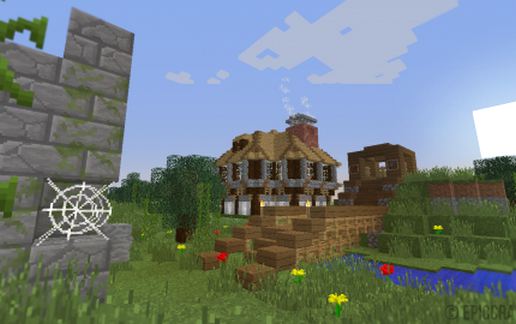
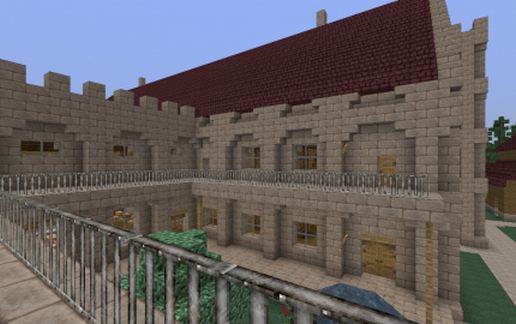
This is an upgraded version of the modest castle, Castle Olaf, and now including grounds and out buildings. It features more underground rooms, and more decoration inside. The grounds features gardens, garden house, chicken coop, stable, kript, and a vineyard. no grapes unless you install growthcraft mod. Castle is fully furnished with kitchen, dining rooms, sleeping quarters, etc, and live dungeons below with spawners. and a small arena. You will need project red to switch the dungeon room lights. the original had vanilla redstone.
This block is clean of all underground ores. World gen is RTG, real terrain gen. my textures are from Herrsommer, Soartex, Misa, BOS, and Ravends, and i have edited those using GIMP software to better blend together the various texture packs.
Minecraft version 1.7.10
building front doors will face West. you will be on the north west corner. stand at water level, 63 feet, 64 eyes. water will be under your feet. be aware, it reaches down to level 20 from here. remove the sandstone wall holding back the water, and fix the landscaping to fit your map. no water, lava, sand, or gravel will spill out no matter where you place it. please i wish other builders would do this. but it did take me extra time. there is much to explore here, more than meets they eye at first glance, and this castle makes a workable survival base, is the one i use as home along with other locations for other purposes. enjoy and be nice to everyone you come in contact with.
This block is clean of all underground ores. World gen is RTG, real terrain gen. my textures are from Herrsommer, Soartex, Misa, BOS, and Ravends, and i have edited those using GIMP software to better blend together the various texture packs.
Minecraft version 1.7.10
building front doors will face West. you will be on the north west corner. stand at water level, 63 feet, 64 eyes. water will be under your feet. be aware, it reaches down to level 20 from here. remove the sandstone wall holding back the water, and fix the landscaping to fit your map. no water, lava, sand, or gravel will spill out no matter where you place it. please i wish other builders would do this. but it did take me extra time. there is much to explore here, more than meets they eye at first glance, and this castle makes a workable survival base, is the one i use as home along with other locations for other purposes. enjoy and be nice to everyone you come in contact with.
Download: Castle Olaf 2 w/grounds schematic for Minecraft
| Format | Size | Use with | |
|---|---|---|---|
.litematic castle-olaf-2-w/grounds.litematic |
119.37 KB | Litematica (Java) — more Litematica schematics |
|
.schem castle-olaf-2-w/grounds.schem |
56.62 KB | WorldEdit / FAWE |
|
.schematic castle-olaf-2-w/grounds.schematic |
82.79 KB | Legacy / online installer |
|
| Install this build directly on your Minecraft map |
|
||
Auto-converted from the original format; container contents (chests, signs) may be missing.
📘 How to use with Litematica (click to expand)
- Put the downloaded
.litematicfile into the.minecraft/schematics/folder. - In game, press M to open the Litematica menu and choose Load Schematics.
- Select the file in the list and click Load Schematic.
- Position the placement where you want it and build — or paste it instantly in creative with Easy Place mode.
Requires the Litematica mod (Java Edition).
More builds: Litematica schematics.
Comments
Similar