Spiral Skyscaper Constuction Site
Published on January 1, 2023
By ronman101
👁️🗨️ 125
36
★
★
★
★
★
Rate it
Screenshots
Description
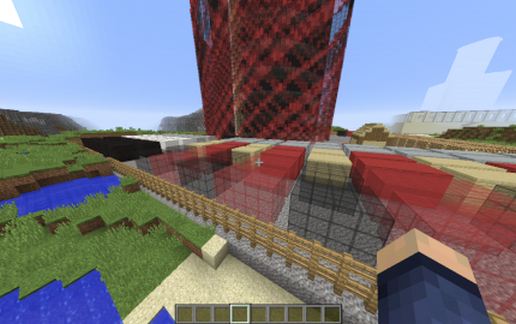
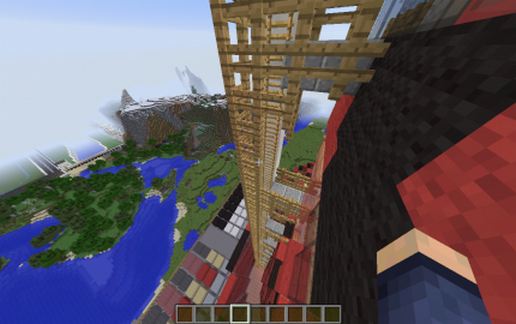
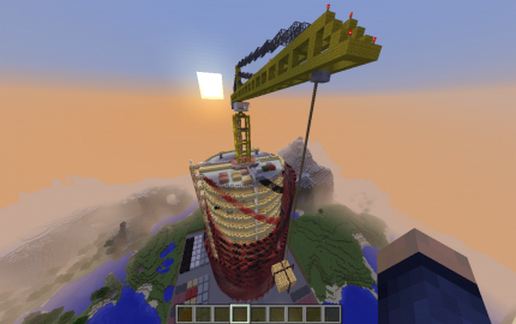
Need a little construction site in your would, I thought the same way, So, here you go. While I finishing up my new spiral skyscraper, I thought I would have some fun and build a one-off version.
This comes complete with a construction crane pulling up a load of glow-stone, plus loads of materials ready to go on top of the building, plus more at ground level. A Construction elevated is attached to the outside of the building between the spirals. This schematic sits on top of a layer of bedrock, so you can place it anywhere in your would (limited to height of 149 blocks).
To be honest, this is difficult to build, and I may it that way (Love a challenge). Construction begins with covering the outside of the building with a Twisted-pattern of Red and Black stain glass windows, and red and black wool between floors. On top of that, I'm creating a secondary outer circle, where the red and black stain-glass twists the pattern in the opposite direction. This will create my atrium, one block at a time (There is no cut and paste...So much for MCEDIT!). If you look closely, you can see the patterns going both ways.
Enjoy the construction site for now!
This comes complete with a construction crane pulling up a load of glow-stone, plus loads of materials ready to go on top of the building, plus more at ground level. A Construction elevated is attached to the outside of the building between the spirals. This schematic sits on top of a layer of bedrock, so you can place it anywhere in your would (limited to height of 149 blocks).
To be honest, this is difficult to build, and I may it that way (Love a challenge). Construction begins with covering the outside of the building with a Twisted-pattern of Red and Black stain glass windows, and red and black wool between floors. On top of that, I'm creating a secondary outer circle, where the red and black stain-glass twists the pattern in the opposite direction. This will create my atrium, one block at a time (There is no cut and paste...So much for MCEDIT!). If you look closely, you can see the patterns going both ways.
Enjoy the construction site for now!
Download: Spiral Skyscaper Constuction Site schematic for Minecraft
| Format | Size | Use with | |
|---|---|---|---|
.litematic spiral-skyscaper-constuction-site.litematic |
137.28 KB | Litematica (Java) — more Litematica schematics |
|
.schem spiral-skyscaper-constuction-site.schem |
39.64 KB | WorldEdit / FAWE |
|
.schematic spiral-skyscaper-constuction-site.schematic |
58.48 KB | Legacy / online installer |
|
| Install this build directly on your Minecraft map |
|
||
Auto-converted from the original format; container contents (chests, signs) may be missing.
📘 How to use with Litematica (click to expand)
- Put the downloaded
.litematicfile into the.minecraft/schematics/folder. - In game, press M to open the Litematica menu and choose Load Schematics.
- Select the file in the list and click Load Schematic.
- Position the placement where you want it and build — or paste it instantly in creative with Easy Place mode.
Requires the Litematica mod (Java Edition).
More builds: Litematica schematics.
Comments
Similar