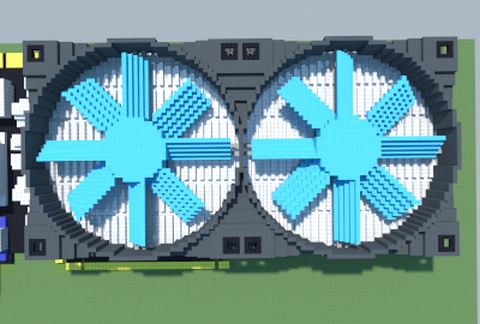
V6000 Ultra Quiet High Performance VGA Cooler (Deepcool)
Published on January 1, 2023
By MatthewStevenGo
👁️🗨️ 148
26
★
★
★
★
★
Rate it
Screenshots
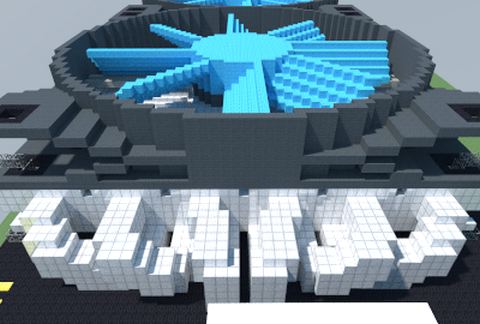
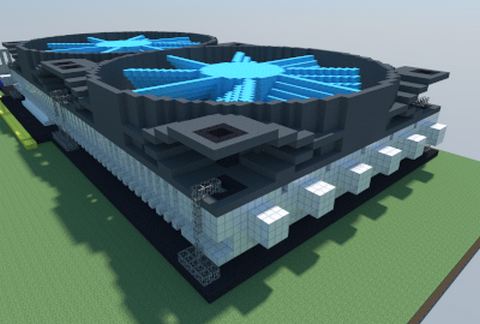
Description
The V6000 is Deepcool's top of the range VGA cooler. The V6000 offers superior cooling performance over the stock cooler thanks to its high quality dual 92 mm fans and array of six nickel-plated heatpipes which run the entire length of the cooler. The fans operate at around 25 dB(A) regardless of load which is much lower than the fan on a typical stock cooler which could be as high as 40 dB(A).
This is a perfect solution for overclockers looking to push their graphics card to its limits and also the silent enthusiast who demands quietness combined with low temperatures.
Features:
= Multi-compatible VGA cooler for both NVIDIA and ATI high-end VGA cards
= Six heatpipes transfer heat from the base to heatsink efficiently
= Aluminium heatsink with dense fin array offers high cooling performance
= Dual 92mm fans with TPE cover fan frame to absorb operating vibration and noise
The V6000's dual 92 mm fans have a rubber-coated frame, which helps to absorb vibration. Both fans have standard a 3-pin connector and a splitter/adapter cable is supplied allowing both fans to attach to one 3-pin fan header on the motherboard.
If your motherboard doesn't have any spare 3-pin fan headers then we would suggest using a PSU adapter such as the Zalman MC1.
The speed of the fans do not vary and remains constant at around 1800 RPM but if you prefer to have control over the V6000's fan speed, we would recommend that you use a Zalman FANMATE 2 or similar fan controller, which will allow you to set your preferred cooling/noise balance.
Source: https://quietpc.co.uk/dc-v6000
NOTE: PCB is not included, only the heatsink with fan is included. :)
This is a perfect solution for overclockers looking to push their graphics card to its limits and also the silent enthusiast who demands quietness combined with low temperatures.
Features:
= Multi-compatible VGA cooler for both NVIDIA and ATI high-end VGA cards
= Six heatpipes transfer heat from the base to heatsink efficiently
= Aluminium heatsink with dense fin array offers high cooling performance
= Dual 92mm fans with TPE cover fan frame to absorb operating vibration and noise
The V6000's dual 92 mm fans have a rubber-coated frame, which helps to absorb vibration. Both fans have standard a 3-pin connector and a splitter/adapter cable is supplied allowing both fans to attach to one 3-pin fan header on the motherboard.
If your motherboard doesn't have any spare 3-pin fan headers then we would suggest using a PSU adapter such as the Zalman MC1.
The speed of the fans do not vary and remains constant at around 1800 RPM but if you prefer to have control over the V6000's fan speed, we would recommend that you use a Zalman FANMATE 2 or similar fan controller, which will allow you to set your preferred cooling/noise balance.
Source: https://quietpc.co.uk/dc-v6000
NOTE: PCB is not included, only the heatsink with fan is included. :)
Download: V6000 Ultra Quiet High Performance VGA Cooler (Deepcool) schematic for Minecraft
| Format | Size | Use with | |
|---|---|---|---|
.litematic v6000-ultra-quiet-high-performance-vga-cooler-(deepcool).litematic |
53.00 KB | Litematica (Java) — more Litematica schematics |
|
.schem v6000-ultra-quiet-high-performance-vga-cooler-(deepcool).schem |
3.50 KB | WorldEdit / FAWE |
|
.schematic v6000-ultra-quiet-high-performance-vga-cooler-(deepcool).schematic |
5.58 KB | Legacy / online installer |
|
| Install this build directly on your Minecraft map |
|
||
Auto-converted from the original format; container contents (chests, signs) may be missing.
📘 How to use with Litematica (click to expand)
- Put the downloaded
.litematicfile into the.minecraft/schematics/folder. - In game, press M to open the Litematica menu and choose Load Schematics.
- Select the file in the list and click Load Schematic.
- Position the placement where you want it and build — or paste it instantly in creative with Easy Place mode.
Requires the Litematica mod (Java Edition).
More builds: Litematica schematics.
Comments
Similar