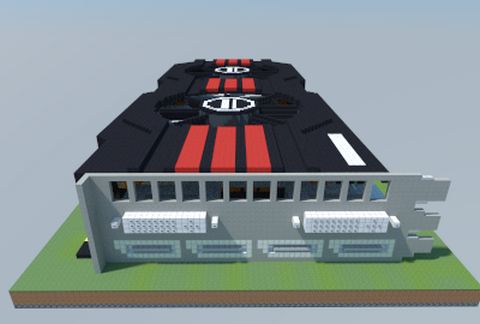
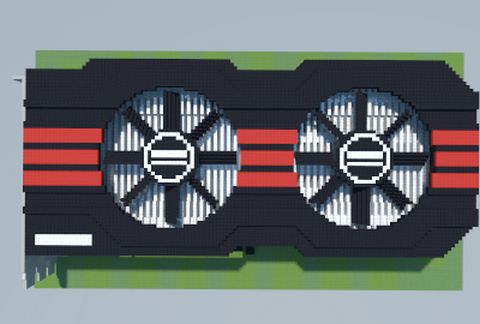
AMD Radeon HD 7970 DirectCU II TOP (ASUS)
Published on January 1, 2023
By MatthewStevenGo
👁️🗨️ 143
26
★
★
★
★
★
Rate it
Screenshots
Description
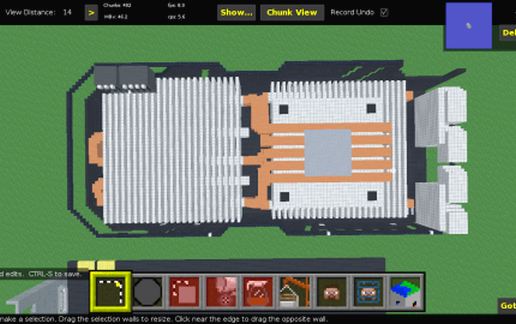
*Updated as the third edition by improving the heatsink design.
Revised version of this: http://www.minecraft-schematics.com/schematic/9253/
An advisory warning on everyone: Seeing that I received the low ratings on my best schematics, I feel it is utterly dumbfounding that many people who ruined the schematic's rating (or score) did NOT know what art looks like when it comes to Pixel Art or anything. From this time on, low ratings (3< stars) are STRICTLY PROHIBITED AT ALL TIMES (IMPORTANT!) as there are multiple users who spammed 0 or 0.5 stars on many schematics in this site that are not yet banned for abusing the 0 star feature. For anyone caught rating 0 stars for no reason, prepare to be sued by some owners of the schematics to be banned for doing this without reason. Additionally, the allowed star is 3.5 stars and above, to be implemented for my schematics and the other's schematics.
The following disallowed ratings on this schematic are here:
= 3.0 stars
= 2.5 stars
= 2.0 stars
= 1.5 stars
= 1.0 stars
= 0.5 stars
= 0.0 stars (most abused against the best schematics)
Revised version of this: http://www.minecraft-schematics.com/schematic/9253/
An advisory warning on everyone: Seeing that I received the low ratings on my best schematics, I feel it is utterly dumbfounding that many people who ruined the schematic's rating (or score) did NOT know what art looks like when it comes to Pixel Art or anything. From this time on, low ratings (3< stars) are STRICTLY PROHIBITED AT ALL TIMES (IMPORTANT!) as there are multiple users who spammed 0 or 0.5 stars on many schematics in this site that are not yet banned for abusing the 0 star feature. For anyone caught rating 0 stars for no reason, prepare to be sued by some owners of the schematics to be banned for doing this without reason. Additionally, the allowed star is 3.5 stars and above, to be implemented for my schematics and the other's schematics.
The following disallowed ratings on this schematic are here:
= 3.0 stars
= 2.5 stars
= 2.0 stars
= 1.5 stars
= 1.0 stars
= 0.5 stars
= 0.0 stars (most abused against the best schematics)
Download: AMD Radeon HD 7970 DirectCU II TOP (ASUS) schematic for Minecraft
| Format | Size | Use with | |
|---|---|---|---|
.litematic amd-radeon-hd-7970-directcu-ii-top-(asus).litematic |
43.71 KB | Litematica (Java) — more Litematica schematics |
|
.schem amd-radeon-hd-7970-directcu-ii-top-(asus).schem |
4.21 KB | WorldEdit / FAWE |
|
.schematic amd-radeon-hd-7970-directcu-ii-top-(asus).schematic |
10.34 KB | Legacy / online installer |
|
| Install this build directly on your Minecraft map |
|
||
Auto-converted from the original format; container contents (chests, signs) may be missing.
📘 How to use with Litematica (click to expand)
- Put the downloaded
.litematicfile into the.minecraft/schematics/folder. - In game, press M to open the Litematica menu and choose Load Schematics.
- Select the file in the list and click Load Schematic.
- Position the placement where you want it and build — or paste it instantly in creative with Easy Place mode.
Requires the Litematica mod (Java Edition).
More builds: Litematica schematics.
Comments
Similar