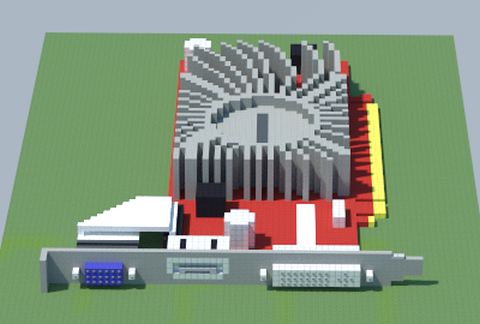
AMD Radeon HD 5450 SILENT (ASUS)
Published on January 1, 2023
By MatthewStevenGo
👁️🗨️ 181
26
★
★
★
★
★
Rate it
Screenshots
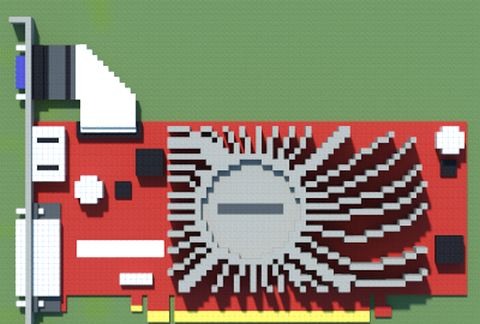
Description
The ATI Radeon™ HD 5450 graphics card offers everything you need for gaming and HD home entertainment in one package. Do more on your PC with ATI stream technology, which accelerates even the most demanding applications. See more with ATI Eyefinity technology, providing the ultimate gaming experience by allowing up to three displays from a single graphics board. The ATI Radeon™ HD 5450 fully supports Microsoft DirectX® 11 which enables real-time rendering with ultra-realistic characters and incredible 3D imagery.
ATI Eyefinity Technology allows two or more display outputs operating simultaneously and cooperatively with one another. Support is available for Duplicated (Clone), Extended Monitor and Single Large Surface mode (SLS). SLS mode is capable of grouping multiple displays into a massive single large display for use with desktop workspace, video playback, with support for both windowed and full screen 3D applications.
- Exclusive 0dB thermal design dissipates heat efficiently without any noise
- Low profile design (Bracket NOT included)
- GPU Guard doubles structural reinforcement to prevent crackings
- Full DX11 support for amazing image quality
- Passive cooling design (SILENT)
- Core Clock: 650MHz
- Memory: 1024MB GDDR3
- Memory Interface: 32-Bit
- Memory Clock: 900MHz (Effective)
- Processing Cores: 80
- Bus Type: PCI-Express 2.1
- Display Connectors: 1 VGA, 1 Dual-Link DVI-I & 1 HDMI
- HDCP Capable
- DirectX 11 Support
- OpenGL 3.2 Support
- ATI Eyefinity Technology
- ATI Avivo HD
- ATI Stream Technology
- Excellent for Media playback
- Support DXVA & surround sound over HDMI
- Dimensions: 7 " x 5.43 " Inch
- 3yr Warranty
Source: https://www.overclockers.co.uk/asus-hd-5450-silent-1024mb-gddr3-pci-express-low-profile-graphics-card-gx-271-as.html
ATI Eyefinity Technology allows two or more display outputs operating simultaneously and cooperatively with one another. Support is available for Duplicated (Clone), Extended Monitor and Single Large Surface mode (SLS). SLS mode is capable of grouping multiple displays into a massive single large display for use with desktop workspace, video playback, with support for both windowed and full screen 3D applications.
- Exclusive 0dB thermal design dissipates heat efficiently without any noise
- Low profile design (Bracket NOT included)
- GPU Guard doubles structural reinforcement to prevent crackings
- Full DX11 support for amazing image quality
- Passive cooling design (SILENT)
- Core Clock: 650MHz
- Memory: 1024MB GDDR3
- Memory Interface: 32-Bit
- Memory Clock: 900MHz (Effective)
- Processing Cores: 80
- Bus Type: PCI-Express 2.1
- Display Connectors: 1 VGA, 1 Dual-Link DVI-I & 1 HDMI
- HDCP Capable
- DirectX 11 Support
- OpenGL 3.2 Support
- ATI Eyefinity Technology
- ATI Avivo HD
- ATI Stream Technology
- Excellent for Media playback
- Support DXVA & surround sound over HDMI
- Dimensions: 7 " x 5.43 " Inch
- 3yr Warranty
Source: https://www.overclockers.co.uk/asus-hd-5450-silent-1024mb-gddr3-pci-express-low-profile-graphics-card-gx-271-as.html
Download: AMD Radeon HD 5450 SILENT (ASUS) schematic for Minecraft
| Format | Size | Use with | |
|---|---|---|---|
.litematic amd-radeon-hd-5450-silent-(asus).litematic |
45.78 KB | Litematica (Java) — more Litematica schematics |
|
.schem amd-radeon-hd-5450-silent-(asus).schem |
1.78 KB | WorldEdit / FAWE |
|
.schematic amd-radeon-hd-5450-silent-(asus).schematic |
3.27 KB | Legacy / online installer |
|
Install this build directly on your Minecraft map
Auto-converted from the original format; container contents (chests, signs) may be missing.
📘 How to use with Litematica (click to expand)
- Put the downloaded
.litematicfile into the.minecraft/schematics/folder. - In game, press M to open the Litematica menu and choose Load Schematics.
- Select the file in the list and click Load Schematic.
- Position the placement where you want it and build — or paste it instantly in creative with Easy Place mode.
Requires the Litematica mod (Java Edition).
More builds: Litematica schematics.