Steampunk ButterFly
Published on March 17, 2026
👁️🗨️ 5326
734
★
★
★
★
★
Rate it
Screenshots

Description
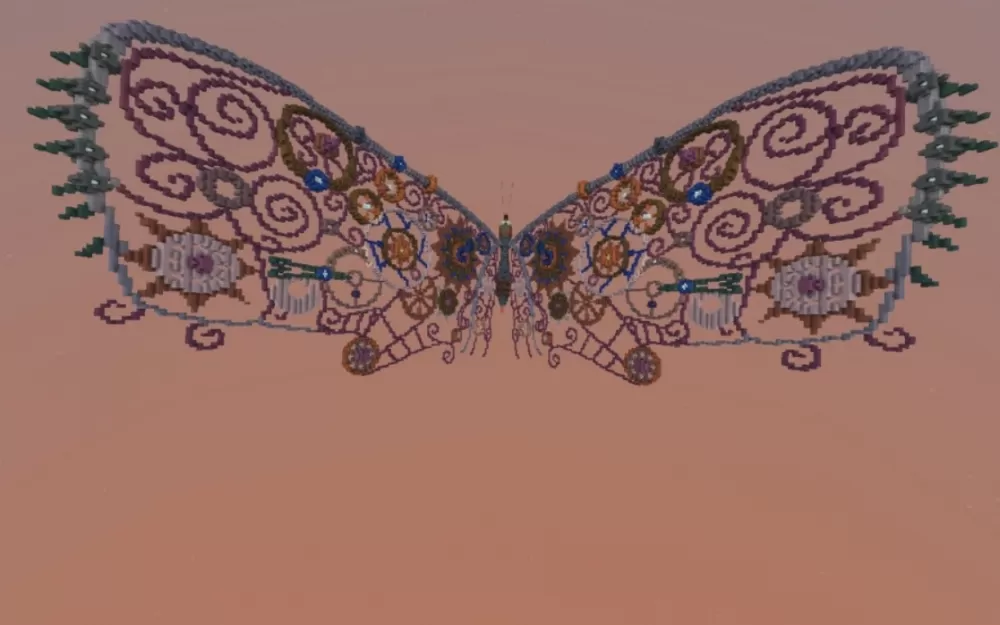
This schematic features an extraordinary steampunk-inspired butterfly sculpture constructed with intricate mechanical detailing and ornate decorative patterns. The wings showcase elaborate swirl and spiral designs rendered in purple and pink hues, with the delicate patterns created through careful block placement that mimics filigree metalwork. The body incorporates industrial elements including gears, pipes, clockwork mechanisms, and blue gem accents that capture the essence of Victorian-era engineering aesthetics. Each wing is adorned with decorative borders featuring chain-like details and mechanical embellishments, while small propeller-like elements extend from the wing tips.
The butterfly's design combines organic wing shapes with hard-edged mechanical components, creating a striking contrast between natural grace and industrial craftsmanship. The color palette uses copper, bronze, and metallic tones for the mechanical elements, complemented by translucent purple and pink materials for the wing membranes and blue accents for focal points. This schematic works perfectly as a centerpiece for steampunk-themed builds, fantasy gardens with mechanical fauna, airship docks, inventor's workshops, or as decorative art installations in creative worlds. The impressive wingspan and detailed construction make it an eye-catching display piece that can be oriented horizontally for flight poses or mounted vertically as wall art.
The butterfly's design combines organic wing shapes with hard-edged mechanical components, creating a striking contrast between natural grace and industrial craftsmanship. The color palette uses copper, bronze, and metallic tones for the mechanical elements, complemented by translucent purple and pink materials for the wing membranes and blue accents for focal points. This schematic works perfectly as a centerpiece for steampunk-themed builds, fantasy gardens with mechanical fauna, airship docks, inventor's workshops, or as decorative art installations in creative worlds. The impressive wingspan and detailed construction make it an eye-catching display piece that can be oriented horizontally for flight poses or mounted vertically as wall art.
Download: Steampunk ButterFly schematic for Minecraft
| Format | Size | Use with | |
|---|---|---|---|
.litematic steampunk-butterfly.litematic |
107.59 KB | Litematica (Java) — more Litematica schematics |
|
.schem steampunk-butterfly.schem |
23.36 KB | WorldEdit / FAWE |
|
.schematic steampunk-butterfly.schematic |
42.10 KB | Legacy / online installer |
|
| Install this build directly on your Minecraft map |
|
||
Auto-converted from the original format; container contents (chests, signs) may be missing.
📘 How to use with Litematica (click to expand)
- Put the downloaded
.litematicfile into the.minecraft/schematics/folder. - In game, press M to open the Litematica menu and choose Load Schematics.
- Select the file in the list and click Load Schematic.
- Position the placement where you want it and build — or paste it instantly in creative with Easy Place mode.
Requires the Litematica mod (Java Edition).
More builds: Litematica schematics.
Comments
Similar