Raptor Paddock
Published on June 11, 2026
👁️🗨️ 3407
500
★
★
★
★
★
Rate it
Description
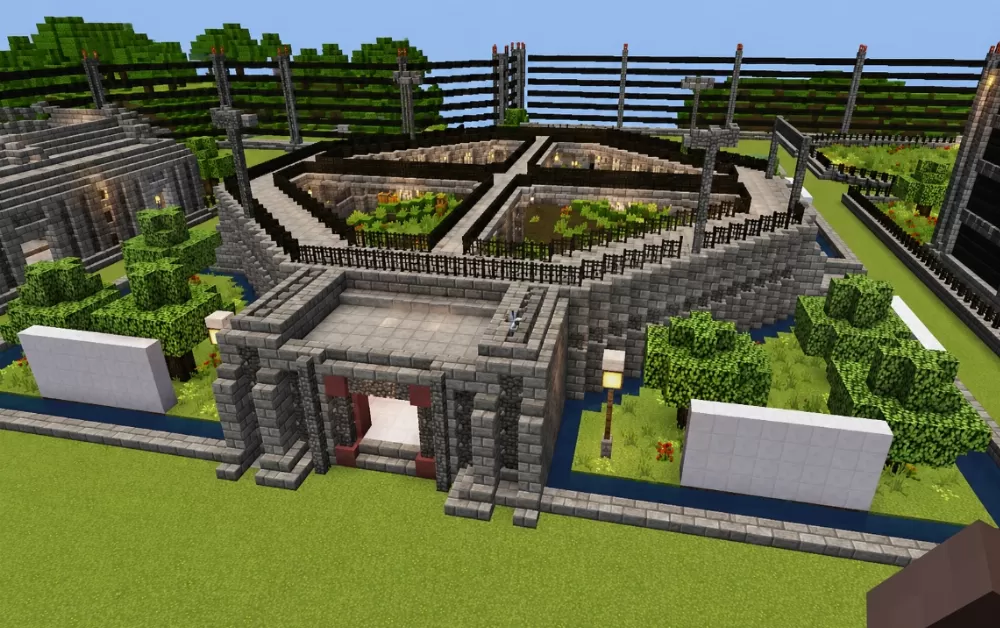
This schematic recreates the iconic Raptor Paddock from Jurassic World, featuring the distinctive enclosure design with a raised stone observation platform, containment pit, and surrounding security infrastructure. The paddock consists of a sunken rectangular enclosure divided into sections by inner walls, filled with dense vegetation to simulate the raptors' habitat. The entire enclosure is surrounded by tall wooden fence barriers with metal framework and torch posts, replicating the industrial security fencing seen in the films. A stone brick control building sits at the front, providing entry access and observer positions overlooking the enclosure, with red security doors and a paved stone courtyard in front.
The facility is surrounded by a water channel that adds an additional separation barrier between the enclosure and the outer grounds, with decorative trees and shrubs providing landscaping around the perimeter. Tall perimeter fence structures with horizontal planks and iron bar framework extend behind the enclosure, reinforcing the containment theme. This schematic works perfectly for Jurassic Park or Jurassic World-themed adventure maps, dinosaur park builds, or any world where players want to recreate the atmosphere of a working dinosaur facility. The recognizable design will immediately resonate with fans of the franchise, and the structure provides a natural setting for roleplay scenarios, mob containment, or simply as an impressive cinematic landmark.
The facility is surrounded by a water channel that adds an additional separation barrier between the enclosure and the outer grounds, with decorative trees and shrubs providing landscaping around the perimeter. Tall perimeter fence structures with horizontal planks and iron bar framework extend behind the enclosure, reinforcing the containment theme. This schematic works perfectly for Jurassic Park or Jurassic World-themed adventure maps, dinosaur park builds, or any world where players want to recreate the atmosphere of a working dinosaur facility. The recognizable design will immediately resonate with fans of the franchise, and the structure provides a natural setting for roleplay scenarios, mob containment, or simply as an impressive cinematic landmark.
Download: Raptor Paddock schematic for Minecraft
| Format | Size | Use with | |
|---|---|---|---|
.litematic raptor-paddock.litematic |
63.84 KB | Litematica (Java) — more Litematica schematics |
|
.schem raptor-paddock.schem |
6.94 KB | WorldEdit / FAWE |
|
.schematic raptor-paddock.schematic |
8.48 KB | Legacy / online installer |
|
| Install this build directly on your Minecraft map |
|
||
Auto-converted from the original format; container contents (chests, signs) may be missing.
📘 How to use with Litematica (click to expand)
- Put the downloaded
.litematicfile into the.minecraft/schematics/folder. - In game, press M to open the Litematica menu and choose Load Schematics.
- Select the file in the list and click Load Schematic.
- Position the placement where you want it and build — or paste it instantly in creative with Easy Place mode.
Requires the Litematica mod (Java Edition).
More builds: Litematica schematics.
Comments
Similar






why is it nnot rendering in editor