Resident Evil 4 Church
Published on June 22, 2026
👁️🗨️ 1570
92
★
★
★
★
★
Rate it
Description
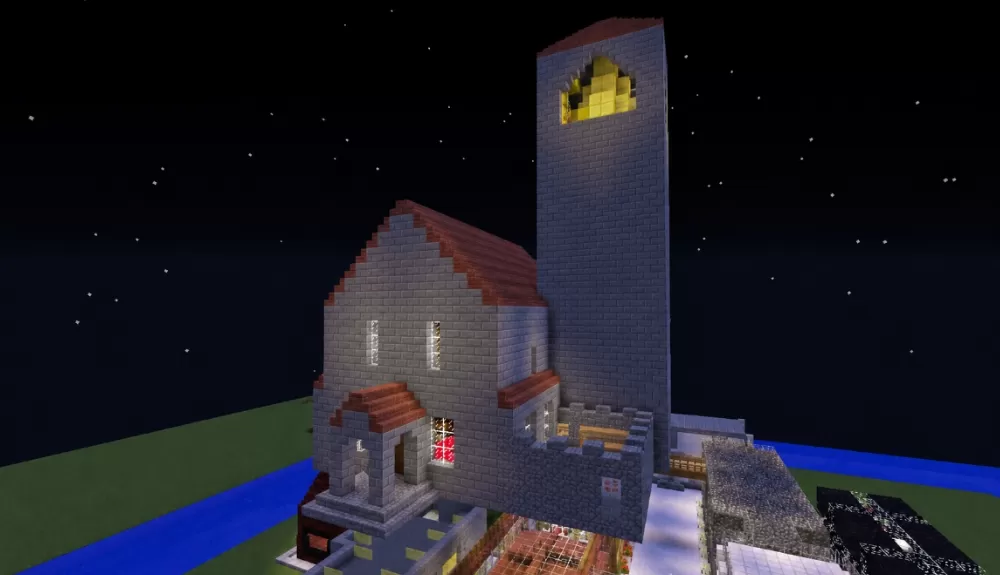
This schematic recreates the iconic Los Iluminados church from Resident Evil 4, the memorable landmark that serves as a central location in the game's story. The building is constructed from stone brick with dark red trim accents on the stepped gable roof, faithfully capturing the European Gothic village church aesthetic of the original. The structure features tall narrow windows with interior lighting, a prominent entrance with stone steps, and a tall square bell tower at the rear with a glowing arched window near the top. Additional attached structures extend from the main building, including a courtyard area with stone detailing.
The schematic includes command blocks that handle entry and exit transitions for the building, replicating the loading zone mechanic from the game. After placing the schematic, the command block coordinates will need to be updated to match the new location for the triggers to function correctly. The church works perfectly as a centerpiece for Resident Evil 4-themed adventure maps, horror survival worlds, or European village builds where a weathered stone church adds atmosphere and narrative weight. Fans of the game will immediately recognize the structure, making it ideal for tribute builds or custom survival horror maps.
The schematic includes command blocks that handle entry and exit transitions for the building, replicating the loading zone mechanic from the game. After placing the schematic, the command block coordinates will need to be updated to match the new location for the triggers to function correctly. The church works perfectly as a centerpiece for Resident Evil 4-themed adventure maps, horror survival worlds, or European village builds where a weathered stone church adds atmosphere and narrative weight. Fans of the game will immediately recognize the structure, making it ideal for tribute builds or custom survival horror maps.
Download: Resident Evil 4 Church schematic for Minecraft
| Format | Size | Use with | |
|---|---|---|---|
.litematic resident-evil-4-church.litematic |
37.85 KB | Litematica (Java) — more Litematica schematics |
|
.schem resident-evil-4-church.schem |
2.67 KB | WorldEdit / FAWE |
|
.schematic resident-evil-4-church.schematic |
3.14 KB | Legacy / online installer |
|
| Install this build directly on your Minecraft map |
|
||
Auto-converted from the original format; container contents (chests, signs) may be missing.
📘 How to use with Litematica (click to expand)
- Put the downloaded
.litematicfile into the.minecraft/schematics/folder. - In game, press M to open the Litematica menu and choose Load Schematics.
- Select the file in the list and click Load Schematic.
- Position the placement where you want it and build — or paste it instantly in creative with Easy Place mode.
Requires the Litematica mod (Java Edition).
More builds: Litematica schematics.
Comments
Similar